sudo renice 10 -u username.
Wednesday, May 27, 2009
Setting new nice value for a user's processes
To set a new nice value for all processes of a user the renice command can be used. For example to set a nice to 10:

Tuesday, May 26, 2009
Matlab: generate unique ID number
To generate a unique ID number for e.g. a temporary file or seed for random number generator current date/time in milliseconds can be used. I matlab the only command that gives time in milliseconds is datestr with FFF input e.g.
Unfortunatly other commands such as cputime or now don't return time in milliseconds, which is not so good.
 datestr(now,'MMSSFFF')

ans =

5139451
datestr(now,'MMSSFFF')

ans =

5140057

UID=datestr(now,'MMSSFFF')

UID =

5214981
Unfortunatly other commands such as cputime or now don't return time in milliseconds, which is not so good.
Sunday, May 24, 2009
CentOS 5: Set a background wallpaper for fluxbox.
To set a background wallpaper for fluxbox in CentOS 5.2 the following command can be used:
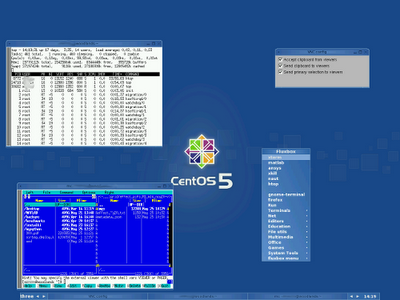
fbsetbg -f /usr/share/backgrounds/images/c5-center-2048x1536.jpg or fbsetbg -f /usr/share/backgrounds/images/default.jpg The above commands in my case was executed in xterm in running fluxbox. The CentOS's wallpapers are in usr/share/backgrounds/.
Friday, May 22, 2009
python: simple start with simplejson
JSON (i.e. JavaScript Object Notation) is a popular way of exchanging data in a string format. It can also be used to provide setup parameters for a program. The second option I used to show very basic JSON usage in python with simplejson package. Lets assume that we have a txt file called data.json with the following JSON code:
{
       "Name": "W",
       "Job": "Programmer",
       "Movies": ["Star Wars", "Star Trek", "Terminator"],
       "Address" : {
               "Street": "Some Streat",
               "House": 3,
               "City": "Some City"
       }
}
The above JSON code can be read into python object using load function as followsIn [7]: import simplejson as json
In [8]: f=open("data.json")
In [9]: data=json.load(f)
In [10]: f.close()
In [11]: data
Out[11]:
{'Address': {'House': 3, 'Street': 'Some Streat', 'City': 'Some City'},
'Job': 'Programmer',
'Movies': ['Star Wars', 'Star Trek', 'Terminator'],
'Name': 'W'}
In [12]: print data['Address']['House']
3
In [13]:
That's it:-)
Wednesday, May 20, 2009
Arch Linux: "Create archive" in gnome context menu
"Create archive" option in context menu is provided by Nautilus extenssion called file-roller. To install it in Arch linux it is enough to write (if sudo was installed previusly) 

sudo pacman -S file-roller With this extension files and folders can be archived, and archve files can be extracted 

Thursday, May 14, 2009


Monday, May 04, 2009
Matlab 2008b: Execute matlab from python in CentOS 5.2
I have Matlab 2008b running on CentOS 5.2 server. I wanted to be able to execute Matlab commands from python. After a search I found mlabwrap 1.0.1. I decided to install it. On CentOS 5.2 I have python 2.4.3. I also installed numpy 1.0.4 from epel repository. numpy is required to install mlabwrap. To install mlabwrap I fallowed the instructions. Fortunately, I had no problems with the installation.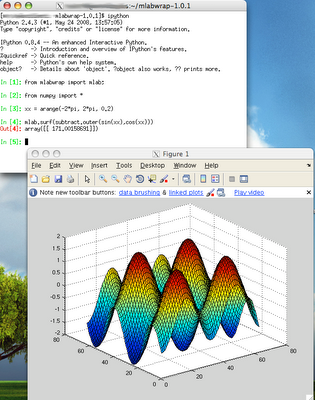 Note: the appearance of the windows in the image is from Mac X because I X forward them from CentOS server.
 Note: the appearance of the windows in the image is from Mac X because I X forward them from CentOS server.
Sunday, May 03, 2009
Arch Linux: dual monitor
I use gnome 2.26.1 + compiz-fusion on my Archlinux box. I wanted to add a second monitor to it. I have nVidia GeFore FX 5200 card and the following drivers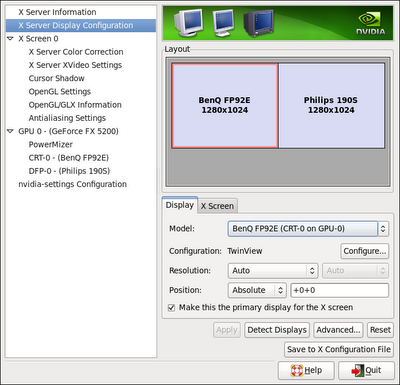 I also attach a photo of my compiz 3D cube on dual monitor screen.
  Later I change the monitors to have two, the same one.
  It can be noticed, that each monitor "is" on a different site of the 3D cube:-)
[W@localhost ~]$ pacman -Q | grep nvidia
nvidia-173xx 173.14.18-2
nvidia-173xx-utils 173.14.18-1
I connected one monitor through DVI cable and the second by the VGA cable. I had no problems setting dual screen using nvidia-settings program (it comes with the above drivers). Below are my settings: I also attach a photo of my compiz 3D cube on dual monitor screen.
  Later I change the monitors to have two, the same one.
  It can be noticed, that each monitor "is" on a different site of the 3D cube:-)
Thursday, April 30, 2009
limits.conf: virtual memory limit
I was setting some limits on CentOS 5.2 with 24GB of RAM. I wanted to set a limit to virtual memory for a process of group of users to be no more than 4GB. Normally, you a user can do this for its own bash session using
ulimit -v 4000000I wanted to do the same thing but to as a root (i.e. admin of a server) to a group of users. Such limits can normally be set in /etc/security/limits.conf. There are many limits# - core - limits the core file size (KB)
# - data - max data size (KB)
# - fsize - maximum filesize (KB)
# - memlock - max locked-in-memory address space (KB)
# - nofile - max number of open files
# - rss - max resident set size (KB)
# - stack - max stack size (KB)
# - cpu - max CPU time (MIN)
# - nproc - max number of processes
# - as - address space limit
# - maxlogins - max number of logins for this user
# - maxsyslogins - max number of logins on the system
# - priority - the priority to run user process with
# - locks - max number of file locks the user can hold
# - sigpending - max number of pending signals
# - msgqueue - max memory used by POSIX message queues (bytes)
# - nice - max nice priority allowed to raise to
# - rtprio - max realtime priority
However, I could not find anything for virtual memory, nor I could find any info about this in the Internet. Therefore, I used the try-and-see approach. Finally, I found that item "as" (i.e. address space limit (kb)) does this! Therefore I made a limit to a group @somegroup hard as 4000000To check it, I logged in to a server using ssh as a user from the "somegroup" and executed[test@w ~]$ ulimit -a | grep virtual
virtual memory (kbytes, -v) 4000000This is of course a limit per process of a user from this group, and not limit for a user of a group!
Monday, April 27, 2009
Matlab: mex error: expected expression before '/' token
Few days ago I installed Matlab 2008b on CentOS 5.2, and I wanted to move my programs from Matlab 2007a on Mac X to the Matlab 2008b on CentOS 5.2. There were no problems with that, execpt my mex C files. When I wanted to compile my mex files in the new Matlab I was getting literally hundreds of errors
my_c.c:653: error: expected expression before '/' token
my_c.c:655: error: expected expression before '/' token
my_c.c:686: error: expected expression before '/' token
my_c.c:688: error: expected expression before '/' token
my_c.c:688: error: expected expression before '/' token
The reason was that in my C files I was using "//" for doing comments, rather than "/* */". By default Matlab 2008b uses ansi standard (i.e. -ansi flag in gcc). The -ansi flag represents ISO C90 (equivalent to flag -std=c89) standard. In this standard there are no "//" for comments. Therefore, I could change all comments in my C files, or compile my C files using -std=c99 flag instead of -ansi flag. In c99 one can use "//" for comments. I choose the second option, and therefore I modified my mexopts.sh file.This file contains default options and flags to be used when executing mex command in matlab (i.e. compiling C files). In my case this this was in my home directory, i.e. ~/.matlab/R2008b/mexopts.sh. So I opened this file and edit parts for my computer. I had CentOS5.2 x64 bits, so I edited part #----------------------------------------------------------------------------
;;
glnxa64)
#----------------------------------------------------------------------------
Specifically, I changed CC='gcc'
CFLAGS=" -ansi -D_GNU_SOURCE"toCC='gcc'
CFLAGS=' -std=c99'
CFLAGS=" $CFLAGS -D_GNU_SOURCE"With this change I had no more errors regarding "//" comments.Tip
To determine which options in mexopts.sh your mex compiler is using, one can just make an error or typo in some options and check if mex will crash or not.
Subscribe to:
Posts (Atom)