Sunday, February 27, 2011

An example of OpenID, Facebook and Twitter authentication in Zend Framework 1.11

This is an example Zend Framework 1.11.3 application that uses OpenID (Google,
Yahoo, MyOpenId, AOL, OpenId) as well as Facebook Connect and Twitter Oauth for
authentication of users.

During authentication, information about a user (e.g. an email or a country) is fetched from the authentication provider.

Zend Framework 1.11 does not have a very good support for OpenID, not mentioning Facebook Connect and Twitter Oauth. Thus, to make it all work the following elements were used:
In some cases slight modifications to the above elements were made.

The demo of this application is here , while the source code is at GitHub. The user authentication is performed in a loginAction in UserController.php.

Hopefully, this example application will be useful to others as it was for me.

Sunday, February 06, 2011

Drupal 7: Add last update date to the footer of the page

I needed to add a date of last modification of the website made in Drupal 7. I did it by enable core module PHP Filter and creating a block located a footer block region. The body of the block was as follows:
<?php
// get date of most most recent change to a node
$result = db_query('SELECT title, changed FROM {node} WHERE status=1 ORDER BY changed DESC LIMIT 1');
$node = $result->fetchObject();
$date = date('d-M-Y g:i a', $node->changed);
echo "Last update: $date";
?>

Saturday, January 22, 2011

Pear run-tests: Setting --cgi option to test file uploads using phpt

In PHP, file uploads can be tested using phpt files as explained here. However, when I wanted to execute phpt test with --POST_RAW-- or --POST-- sections, pear run-tests was giving an error that: --cgi option needed for this test, type 'pear help run-tests' My phpt file was as follows: The layout of phpt files is explained here. To overcome this problem I installed php5-cgi package for ubuntusudo apt-get install php5-cgiThis allowed for correct execution of the testpear run-tests --cgi=/usr/lib/cgi-bin/php5 example-upload.phpt
Running 1 tests
PASS Example test emulating a file upload[example-upload.phpt]
TOTAL TIME: 00:00
1 PASSED TESTS
0 SKIPPED TESTS

Sunday, January 02, 2011

Ubuntu 10.10: Change grub menu timeout

Default grub menu timeout is 10 seconds. To change it just edit the grub filesudo vim /etc/default/grub and change GRUB_TIMEOUT value from 10 to e.g. 2. Then update grubsudo update-grubAfter the restart the time before boot your default operating system be 2 seconds.

Alternatively, one can install GUI grub editor called StartUp-Manager sudo apt-get install startupmanager

Monday, December 13, 2010

Ubuntu 10.10: static and noise sound with HDA Intel SigmaTel STAC9221 A1

I have just installed Ubuntu 10.04 and I found that my sound card was not working. There was a lot of breaks, noise and freezes when I was playing any audio file.

This is what I have: aplay -l
**** List of PLAYBACK Hardware Devices ****
card 0: Intel [HDA Intel], device 0: STAC92xx Analog [STAC92xx Analog]
Subdevices: 0/1
Subdevice #0: subdevice #0
card 0: Intel [HDA Intel], device 1: STAC92xx Digital [STAC92xx Digital]
Subdevices: 1/1
Subdevice #0: subdevice #0
cat /proc/asound/version
Advanced Linux Sound Architecture Driver Version 1.0.23.
cat /proc/asound/card0/codec#* | grep Codec
Codec: SigmaTel STAC9221 A1


I overcame this problem simply by adding the following line:options snd-hda-intel model=ref into the file /etc/modprobe.d/alsa-base.conf:sudo gedit /etc/modprobe.d/alsa-base.conf

Monday, June 21, 2010

"Remote desktop session has ended" error when connecting to a guest on VirtualBox

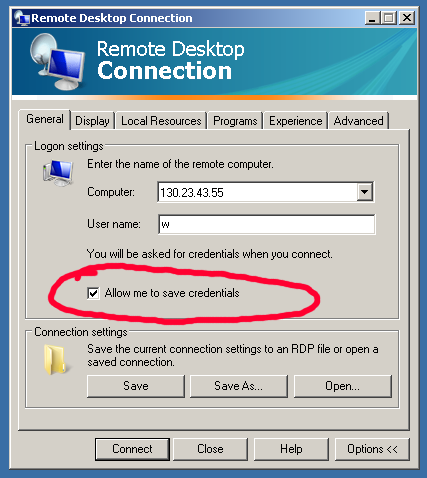
I had a problem connecting from Windows using build-in Remote Desktop Connection program to a a guest on a headless VirtualBox server. I found that the reason wast that I did not checked "Allow me to save credentials" option in a Remote Desktop Connection.
With this option, the client will ask for username/password before connecting to the VirtualBox. Thus it seems, that VirtualBox requires user credentials at the very beginning of the session. Without this option, connections will fail.

I was using VirtualBox 3.2.4 in a headless mode running on a CentOS 5.5 x86_64.

Saturday, May 29, 2010

Example of SSH tunneling

Example:
ssh -N -L 5904:127.0.0.1:5901 username@remoteserverThe above command forwards everything on localhost port 5904 to the port 5901 on remoteserver. This is what I use to connect to a VNC service on port 5901 on a remoteserver at my job from my home computer. Thus, at home, after establishing the above tunnel I can use a vncviewer as follows:vncviewer :4

Friday, May 14, 2010

VirtualBox: start and stop a guest in a headless mode

Lets assume that we have a guest VirtualBox machine called "xp". To start it in a headless mode we can use VBoxHeadless --startvm "xp"To stop it we can use VBoxManage controlvm "xp" savestateSince it is in a headless state we have to access it using a RDP viewer, e.g. rdesktop command in Linux:desktop -u username -p password -a 16 serverIPOf course, before we can use it in this way, we have to enable remote destkop for the "xp" machine and define authentication method. In my case, I used External method, since it uses the linux user account under which my VirtualBox is running.

Sunday, April 25, 2010

bash: send a command to a screen session

"Screen is a full-screen window manager that multiplexes a physical terminal between several processes, typically interactive shells." It is a very useful tool, that I often use, as it allows me to run "multiple terminals in one" even when I log out from the system.

So how to send command to screen session from other terminal. In other words how to remote-control a screen session from within a script. This post is useful for this.

In particular, I wanted to execute matlab scripts in screen windows. To do this I used the following:
1. Create screen sessionscreen -S matlab2. Create few windows in the screen session using Ctr-a c
3. Send matlab command to each as followsfor ((i=0;i<$NO_WINDOWS;i+=1)); do
echo $i
sleep 2
screen -S matlab -p $i -X exec matlab -nodesktop -r "bashCalculations('part',$i+1)"
done
where bashCalculations is my matlab script bashCalculations.m that takes part argument. So,, each screen window executes different part of my script.

Saturday, April 24, 2010

Ubuntu 10.04: How to remove chat and mail icons (indicators) from system tray

The 10.04 LTS release of Ubuntu seems to be very, very good. However, for some strange reason, creators of this release made some strange decisions about Ubuntu's look-and-feel. One of the things that annoyed me was the assumption that every Ubuntu user, uses Twitter, Facebook or other social network. Thus, they incorporated the tools for using social networking sites into the distibution. They did it by adding chat and status icons/notifiers into Gnome system try. However, what they did not do, was the ability to easily remove them. For example, when you remove massage notifier (mail icon) using "Remove From Panel" option, the volume control icon also disappears.
Thus you need to remove these icons some other way, which in this case, is to remove two packages: indicator-me and indicator-messages:sudo apt-get remove indicator-me indicator-messagesAfter that just log-out and log-into the gnome session and the icons should be gone:

EDIT
It also should work for Ubuntu 11.04 (Natty Narwhal).