This happened to me today, when I installed new Windows XP on a PC with pre-installed Ubuntu. Fortunately, fast I used Super Grub Disk witch can easily repair what Windows XP destroyed. Restroing former boot menu, was just a matter of few seconds.
Wednesday, January 31, 2007

Wednesday, January 17, 2007
Interesting USB drive
Yesterday, I got nice present from my girfriend - a USB key. It is quite interesting model,
because it was given for free as a promotion for a chewing gum :-). This USB drive looks like
box of gum; hence, at first I thought that I was given a gum. I was quite surprise to find
USB storage instead gum. This USB drive, is quite small as for today standards ( only 64MB),
but is something. For example I can use it to carry DSL (Damn Small Linux) distribution. For
now I'm planing to use it normally, because it is nice and many people are surprise when
I show it to them.
because it was given for free as a promotion for a chewing gum :-). This USB drive looks like
box of gum; hence, at first I thought that I was given a gum. I was quite surprise to find
USB storage instead gum. This USB drive, is quite small as for today standards ( only 64MB),
but is something. For example I can use it to carry DSL (Damn Small Linux) distribution. For
now I'm planing to use it normally, because it is nice and many people are surprise when
I show it to them.


Monday, January 15, 2007
Ruby: bash image processing
As working mainly with images and image processing, sometimes I have to do one or two simple operations on many files at once like resizing, converting RGB two Gray, changing format of images, mirroring, blurring, etc. To this time I was always using Matlab to do it, because I could not find any free software on Mac X that can do such simple operations. Nonetheless, there are some issues with Matlab that annoy me, specifically: there is no native Matlab for Intel Mac X 10.4. Matlab works on Mac X 10.4 only by emulation mode, which is extremely slow and most importantly crashes very often. I had to find some more reliable solution, and I find it in Ruby.
Ruby, has very good image processing package called RMagick (interface between the Ruby programming language and the ImageMagick and GraphicsMagick image processing libraries). Installation is quite trivial. Explanation how to install RMagick on Mac X is here. I fallowed those instructions and had no problem.
Ruby, has very good image processing package called RMagick (interface between the Ruby programming language and the ImageMagick and GraphicsMagick image processing libraries). Installation is quite trivial. Explanation how to install RMagick on Mac X is here. I fallowed those instructions and had no problem.
#!/opt/local/bin/ruby
#convertFiles.rb
require 'rubygems'
require 'RMagick'

class ConvertFiles

 def initialize inDir='inputDir/', outDir='out/'
   raise 'No INPUT dir' if !File.exist? inDir
   @inDir = inDir
   @outDir = outDir
   @files = Array.new
   readFiles
   createOutDir
 end

 def readFiles
   Dir.glob(@inDir+'*.tiff').each { |l|
     @files.push File.basename(l)
   }
 end

 def createOutDir
   Dir.mkdir(@outDir) if !File.exist? @outDir
 end

 def singleImgProcess img
   return  img.scale!(0.50)
 end

 def bashProcess
   @files.each { |fn|
     puts @inDir+fn
     img=Magick::Image.read(@inDir+fn).first
     img = singleImgProcess img
     img.write(@outDir+fn)
   }
 end

end
Example usage is also quite simple:
Moreover, if I need some other operation or operations, I can just create new class, inheriting from the above one e.g.:
c = ConvertFiles.new
c.bashProcess
class Enlarge < ConvertFiles
def singleImgProcess img
 return  img.scale!(1.50)
end
end

e = Enlarge.new
e.bashProcess
Or if I want to add some text to all images, I just can do:
This simple code, shows how powerful and convenient Ruby can be.class AddText < ConvertFiles
def setText t
@txt = t
end
def singleImgProcess img
@txt='Default' if @txt.nil?
text = Magick::Draw.new
text.annotate(img, 0, 0, 0, 60, @txt) {
self.gravity = Magick::SouthGravity
self.pointsize = 48
}
return img
end
end
a=AddText.new
a.setText 'My pictures'
a.bashProcess
Sunday, January 14, 2007
DVD player: LG DNX-190 UH
I have just bought DVD Player - LG DNX-190 UH:
 Unfortunately, to make it work was quite a big problem. My TV has only S-Video socket for video input, so I thought that when I connect my new DVD and TV using S-Video cable, it would work without any problems. Of course, it did not. There was no picture! I had sound working, but I did not see anything. Studying a manual, I discoverd that in order to use S-Video connection, you have to go to Setup menu in DVD, and change it there. This is just great!!!. How can I manipulate Setup options if I do not have any picture?!!!. Impressed by this genius solution from Korean engineers I get quite angry. Of course before that, I had gotten angry, because my dvd box did not include S-Video cable, but fortunately, I had my own.
The only thing I could do, was to take this rubbish dvd player, go to my friend, connect it using Video cable, change the S-Video option in Setup menu in his place, return home, and connect to my TV. After that I finally could see something on my DVD.
For now, I have not seen any movie, so I do not know if this dvd player can play movies correctly. I have just start one or two movies to see if they work. They worked. I have not had time to investigate how useful and convenient this dvd player is, and if he plays everything correctly.
One positive thing about it for now, is the fact that in shop I was given a sheet of paper witch 'cheats', how to make this dvd palyer multi-region. I have not tried it, so I cannot say if it works, and even if, I do not have any dvd movie from another dvd region.
UPDATE
Finally I had some time to look closer to this DVD. After few minutes, I decided to return this rubbish DVD player. This junk was playing DVDs with some 'cracks' in a picture which sometimes was 'jumping'. It was not very often, and as a matter of fact, you could watch movies, but those occasional 'jumps' were annoying. Not thinking much, I return this junk, and I had it replaced. Fortunately, the shop did not make any problems with exchange, just 'no question asked'.
 Unfortunately, to make it work was quite a big problem. My TV has only S-Video socket for video input, so I thought that when I connect my new DVD and TV using S-Video cable, it would work without any problems. Of course, it did not. There was no picture! I had sound working, but I did not see anything. Studying a manual, I discoverd that in order to use S-Video connection, you have to go to Setup menu in DVD, and change it there. This is just great!!!. How can I manipulate Setup options if I do not have any picture?!!!. Impressed by this genius solution from Korean engineers I get quite angry. Of course before that, I had gotten angry, because my dvd box did not include S-Video cable, but fortunately, I had my own.
The only thing I could do, was to take this rubbish dvd player, go to my friend, connect it using Video cable, change the S-Video option in Setup menu in his place, return home, and connect to my TV. After that I finally could see something on my DVD.
For now, I have not seen any movie, so I do not know if this dvd player can play movies correctly. I have just start one or two movies to see if they work. They worked. I have not had time to investigate how useful and convenient this dvd player is, and if he plays everything correctly.
One positive thing about it for now, is the fact that in shop I was given a sheet of paper witch 'cheats', how to make this dvd palyer multi-region. I have not tried it, so I cannot say if it works, and even if, I do not have any dvd movie from another dvd region.
UPDATE
Finally I had some time to look closer to this DVD. After few minutes, I decided to return this rubbish DVD player. This junk was playing DVDs with some 'cracks' in a picture which sometimes was 'jumping'. It was not very often, and as a matter of fact, you could watch movies, but those occasional 'jumps' were annoying. Not thinking much, I return this junk, and I had it replaced. Fortunately, the shop did not make any problems with exchange, just 'no question asked'.
Tuesday, January 09, 2007
Mac X: Making backup of your dvd movie
Sometimes people buy dvd movies, for AU$30-40 and of course they would like to make a copy of it, because it wouldn't be nice to destroy original disks.
Windows users don't have problems with that, because there exists great free tool to do it called DVD Shirnk. I used it to make backup of my collection of Star Wars movies, and it is really worth of recommending.
But what about Mac X users? At the moment I want to backup one freshly bought movie, and unfortunately on Mac X this task is not so trivial. First of all, there is no free tool (at least I could not find any) to do this. Of course there are many commercial software that can be helpful, but I do not what to spend money, on software that is used really rarely.
Therefore, what I do is, I use two tools to make backups. First, I use free MacTheRipper (A DVD extractor) to dump movie to hard drive. It must be noted, that MacTheRipper do not compress (shrink) movies; thus, if your move is bigger that 4.37GB, you have to use another tool, to shirk it, after it was copied to hard drive.
To shrink movie, you can use: Popcorn, DVD2OneX, DVDRemaster or Toast Titanium. Luckily for me, I owe the last program. Therefore, I can burn shirked movie to DVD5.
Nevertheless, this workaround solution is not as good as the one using DVD Shrink on Windows. First and foremost, you cannot choose what parts of DVD you want to extract like which languages, sound, subtitles, extra features etc. MacTheRipper gives you opportunity mainly to dump main movie only, all full dvd. You cannot select that you want e.g. English subtitles only or/and Polish ones.
But, for now I do not see any great alternative for me in the task of backuping dvd movies on Mac X.
Windows users don't have problems with that, because there exists great free tool to do it called DVD Shirnk. I used it to make backup of my collection of Star Wars movies, and it is really worth of recommending.
But what about Mac X users? At the moment I want to backup one freshly bought movie, and unfortunately on Mac X this task is not so trivial. First of all, there is no free tool (at least I could not find any) to do this. Of course there are many commercial software that can be helpful, but I do not what to spend money, on software that is used really rarely.
Therefore, what I do is, I use two tools to make backups. First, I use free MacTheRipper (A DVD extractor) to dump movie to hard drive. It must be noted, that MacTheRipper do not compress (shrink) movies; thus, if your move is bigger that 4.37GB, you have to use another tool, to shirk it, after it was copied to hard drive.
To shrink movie, you can use: Popcorn, DVD2OneX, DVDRemaster or Toast Titanium. Luckily for me, I owe the last program. Therefore, I can burn shirked movie to DVD5.
Nevertheless, this workaround solution is not as good as the one using DVD Shrink on Windows. First and foremost, you cannot choose what parts of DVD you want to extract like which languages, sound, subtitles, extra features etc. MacTheRipper gives you opportunity mainly to dump main movie only, all full dvd. You cannot select that you want e.g. English subtitles only or/and Polish ones.
But, for now I do not see any great alternative for me in the task of backuping dvd movies on Mac X.
Saturday, December 16, 2006
VNC server on Mac classic (8.6)
Similarly, like in the former post I would like to work from my Mac X Tiger, Linux, Solaris, Windows or any other system that I use at work, on my old Mac OS 8.6.
I decided to try to install VNC server on Mac classic and try how it goes.
I installed chromivnc server 3.40a5. The only thing after the installation, or rather I should say unpacking, was to copy vncPatches file to Systems Folder/Extensions and restart my mac. Afterwards, I started vnc server without any problems, and that was it. My vnc server on Mac 8.6 was working.
Nevertheless, I have to admit, that it is considerably slower with comparisons to more newer version of vnc for Mac X, or Linux. However, it is enough for fast, small work on Mac OS 8.6.
Below image showing Kubuntu with VNC connection to Mac X Tiger and Mac OS 8.6

I decided to try to install VNC server on Mac classic and try how it goes.
I installed chromivnc server 3.40a5. The only thing after the installation, or rather I should say unpacking, was to copy vncPatches file to Systems Folder/Extensions and restart my mac. Afterwards, I started vnc server without any problems, and that was it. My vnc server on Mac 8.6 was working.
Nevertheless, I have to admit, that it is considerably slower with comparisons to more newer version of vnc for Mac X, or Linux. However, it is enough for fast, small work on Mac OS 8.6.
Below image showing Kubuntu with VNC connection to Mac X Tiger and Mac OS 8.6

Friday, December 15, 2006
VNC client on Mac classic (8.6)
Sometimes in my work I had to use Mac OS 8.6. Problem with this is, that this is very old operating system, and there are not new application on it. Most importantly the problem is with web browser. There are only Internet Explorer 5.0, Mozilla 1.3, and few other very, very old ones; thus, when I work on Mac 8.6 and want to use the Internet there is problem, because many web-pages don't work on such old browsers (e.g. google spreadshead). Of course, other programs like Matlab or GIMP are unavailable on Mac classic. This was of course very annoying me, because when I was using 8.6 I could not do other my work, because of lack of software.
Finally, recently I found solution. It is simply installing VNC server on my Mac X 10.4 and installing VNC client on Mac 8.6 and using this client to work on Tiger, while being on Classic.
Nonetheless, finding and starting VNC client on Mac Classic was not so simple. After some searching and reading I found what I was looking for, and I would like to shear with it. Hopefully it will be useful for someone :-)
Finally, recently I found solution. It is simply installing VNC server on my Mac X 10.4 and installing VNC client on Mac 8.6 and using this client to work on Tiger, while being on Classic.
Nonetheless, finding and starting VNC client on Mac Classic was not so simple. After some searching and reading I found what I was looking for, and I would like to shear with it. Hopefully it will be useful for someone :-)
VNC client on Mac Classic is VNCThing 2.2 to download e.g. from here.
Morever, to run this client it is necessary to have
CarbonLib 1.6 from here.
After installation of those programs I could enjoy my Mac X 10.4 from Mac 8.6.
Below to screen showing Mac 8.6 with VNC client connected to Mac X Tiger.


Tuesday, December 05, 2006
Ruby: Using DarwinPorts' Ruby instead of Mac X's
If you are familiar with Mac X, probably you heard about DarwinPorts ("The DarwinPorts Project's main goal is to provide an easy way to install various open-source software products"). If you are interested in Ruby, you probably know that Mac X Tiger comes with pre-installed Ruby 1.8.2. Nevertheless, using DrawinPorts you can install more newer version of Ruby (1.8.4) just by writing:
Unfortunately after the installation you will have two Ruby's in your systems, and your xterm console by default will use the first one. In order to use second one, the PATH environmental variable must be slightly change i.e. putting directory
sudo port install ruby .Unfortunately after the installation you will have two Ruby's in your systems, and your xterm console by default will use the first one. In order to use second one, the PATH environmental variable must be slightly change i.e. putting directory
/opt/local/bin (DarwinPorts default directory) before every other directory in PATH. As a results programs in /opt/local/bin will have priority over the other programs.To change the path you can execute just:
export PATH=/opt/local/bin:$PATH
Sunday, November 26, 2006
Ruby: one liners
Sometimes it is necessary to do some simple things, like replacing some words in given file, processing output of the Unix command. To such operation, usually writing a Ruby script is just unnecessary, due to possibility of creating one line so-called one liners programs, short script as Ruby command-line option:
For example simple grep program can be implemented in Ruby as:
Or, for instance, if one wants to save a list of all *.tif, *.TIF, *.tiff, *.TIFF files in given directory in lowercase:
Of course, those examples can be done without the need of Ruby, just by using standard Unix command, but sometimes it is easer to use e.g. Ruby (the same thing can be done using Perl, Python, awk,...) than to look for syntax of a given command. If one is familiar with e.g. Ruby, few separate Unix commands can be done in one Ruby command-line program.
Many other handy examples of ruby one liners can be found here.
-e 'command' and -n , where:-
-e 'command'- Executes command as one line of Ruby source. Several e’s are allowed, and the commands are treated as multiple lines in the same program. If programfile is omitted when e is present, execution stops after the e commands have been run. Programs 1.8 run using e have access to the old behavior of ranges and regular expressions in conditions—ranges of integers compare against the current input line number, and regular expressions match against $_. -
-n- Assumes a while gets; ...; end loop around your program.
For example simple grep program can be implemented in Ruby as:
ruby -n- e "print if /blabla/" *.txt
Or, for instance, if one wants to save a list of all *.tif, *.TIF, *.tiff, *.TIFF files in given directory in lowercase:
ls -l | ruby -n -e ' puts split[8].downcase if $_.to_s.upcase =~/TIFF?/' > list.txt
Of course, those examples can be done without the need of Ruby, just by using standard Unix command, but sometimes it is easer to use e.g. Ruby (the same thing can be done using Perl, Python, awk,...) than to look for syntax of a given command. If one is familiar with e.g. Ruby, few separate Unix commands can be done in one Ruby command-line program.
Many other handy examples of ruby one liners can be found here.
Tuesday, November 07, 2006
Firefox 2.0: Session Restore
After more then a week of using Firefox 2.0 on my Intel Mac X 10.4 I can say it is nice, especially spell checking. Nonetheless, it is not super due to crashes.
For example, one of many websites that crashes Firefox 2.0 is http://www.sf.airnet.ne.jp/~ts/japanese/vowels.html . I do not know why, but I know that when it happens I have to use Safari to look for those 'bed' sites. Of course I do not say it is in general and true for every user of Firefox 2.0, I assume that it is only my Mac that has problem with this one website.
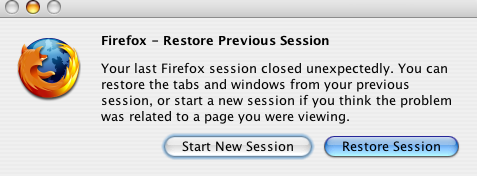
Despite this problem with some pages, it could be worse. The fact that it is not so totally bed, is new option in second edition of Firefox called Session Restore. From Firefox web side:
And this is nice. Even thought my Firefox crashes, I do not loose all tabs and most importantly I do not have to go to pages again which sometimes may be difficult if you have many tabs open. I have them automatically restored.
For example, one of many websites that crashes Firefox 2.0 is http://www.sf.airnet.ne.jp/~ts/japanese/vowels.html . I do not know why, but I know that when it happens I have to use Safari to look for those 'bed' sites. Of course I do not say it is in general and true for every user of Firefox 2.0, I assume that it is only my Mac that has problem with this one website.
Despite this problem with some pages, it could be worse. The fact that it is not so totally bed, is new option in second edition of Firefox called Session Restore. From Firefox web side:
Now, with Session Restore, if Firefox has to restart or closes when it comes back you’ll pick up exactly where you left off. The windows and tabs you were using, the text you typed into forms, and the in-progress downloads you had running will all be restored. You can even set Firefox 2 to always restore your previous session instead of loading a home page, so you’ll never lose your place again.
And this is nice. Even thought my Firefox crashes, I do not loose all tabs and most importantly I do not have to go to pages again which sometimes may be difficult if you have many tabs open. I have them automatically restored.
Subscribe to:
Posts (Atom)