Sunday, November 26, 2006

Ruby: one liners

Sometimes it is necessary to do some simple things, like replacing some words in given file, processing output of the Unix command. To such operation, usually writing a Ruby script is just unnecessary, due to possibility of creating one line so-called one liners programs, short script as Ruby command-line option: -e 'command' and -n , where:
  • -e 'command' - Executes command as one line of Ruby source. Several e’s are allowed, and the commands are treated as multiple lines in the same program. If programfile is omitted when e is present, execution stops after the e commands have been run. Programs 1.8 run using e have access to the old behavior of ranges and regular expressions in conditions—ranges of integers compare against the current input line number, and regular expressions match against $_.
  • -n - Assumes a while gets; ...; end loop around your program.

For example simple grep program can be implemented in Ruby as:

ruby -n- e "print if /blabla/" *.txt


Or, for instance, if one wants to save a list of all *.tif, *.TIF, *.tiff, *.TIFF files in given directory in lowercase:

ls -l | ruby -n -e ' puts split[8].downcase if $_.to_s.upcase =~/TIFF?/' > list.txt

Of course, those examples can be done without the need of Ruby, just by using standard Unix command, but sometimes it is easer to use e.g. Ruby (the same thing can be done using Perl, Python, awk,...) than to look for syntax of a given command. If one is familiar with e.g. Ruby, few separate Unix commands can be done in one Ruby command-line program.

Many other handy examples of ruby one liners can be found here.

Tuesday, November 07, 2006

Firefox 2.0: Session Restore

After more then a week of using Firefox 2.0 on my Intel Mac X 10.4 I can say it is nice, especially spell checking. Nonetheless, it is not super due to crashes.

For example, one of many websites that crashes Firefox 2.0 is http://www.sf.airnet.ne.jp/~ts/japanese/vowels.html . I do not know why, but I know that when it happens I have to use Safari to look for those 'bed' sites. Of course I do not say it is in general and true for every user of Firefox 2.0, I assume that it is only my Mac that has problem with this one website.

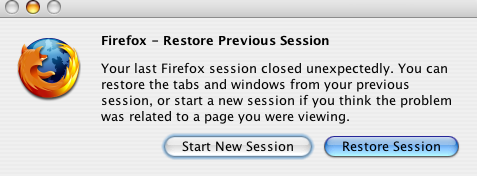
Despite this problem with some pages, it could be worse. The fact that it is not so totally bed, is new option in second edition of Firefox called Session Restore. From Firefox web side:

Now, with Session Restore, if Firefox has to restart or closes when it comes back you’ll pick up exactly where you left off. The windows and tabs you were using, the text you typed into forms, and the in-progress downloads you had running will all be restored. You can even set Firefox 2 to always restore your previous session instead of loading a home page, so you’ll never lose your place again.


And this is nice. Even thought my Firefox crashes, I do not loose all tabs and most importantly I do not have to go to pages again which sometimes may be difficult if you have many tabs open. I have them automatically restored.


Sunday, November 05, 2006

Matlab: Lack of multithread

In my everyday work I use Sun-Fire-V440 server. The main characteristics of this machine is the fact that it contains four processors, which is great. I use it mainly
to write image processing algorithms in Matlab 7.0, which are usually very time consuming and require wast amount of resources.

Despite the power of this machine, I cannot use it fully due to Matlab. This is because by definition it is only singe threaded application and there is on way of creating few threads. This of course causes that even thought given algorithm or application could be divided to e.g. four parallel threads, it cannot be done due to Matlab.

This drawback of Matlab is really frustrating, because Matlab uses fully only one processor out of four. On the other words, while one processors is fully loaded, three others do not do anything useful. As a result of that, my computations take four times more time to finish, compared with the situation if I could use all four processors in Matlab.

For instance, sometimes I write something in ANSI C, and there is no problem of creating threads; hence, my algorithms in ANSI C are four time faster than the same single threat algorithms on this Sun server, because they use all four processors.

Nevertheless, using single thread Matlab on four-processors server has some advantage. The main advantage of this is that I can run four separate Matlab instances, which I do often. For example, if I have one thousand images to process, I can run four matlab in four consoles, and I can tell that the first instance processes images from 1 to 250, second one processes 251 to 500, third and forth one 501-750 and 751 to 1000 respectively.
Moreover, I can run four Matlabs processing 1000 images each, but with different parameters. Consequently I can check my program with four different parameters and check their impact on the results simultaneously, rather than execute one version of program by another. This also uses four processors and I can do my work four times faster than on single Matlab instance.

Thanks to this, even though my application is single threaded, I can process 1000 images four time faster using four Matlabs than using one Matlab. This way, 100% of computation power of my server is used, and all four processor are doing something useful.

Below I present screen from top command, showing four Matlabs using in summary almost 100% of CPU power of my Sun.

Thursday, November 02, 2006

Mac X: Virtual desktops

Yesterday by a chance I went to Apple website and I found a sneak peak of Mac X 10.5 (Leopard).
I have to admit that it looks impressive; nevertheless, as far as I am concerned the only thing that I really look forward to is Spaces, or just simply virtual desktops, which by the way is great news.

I think I do not have to explain what virtual desktops are. Everyone who has every used Gnome or KDE in Linux should know it. The only thing I can say is that they are very, very convenient because:

They increase a user's ability to organize their windowed applications that are currently running by reducing clutter. - wikipedia

Lack of virtual desktops systems (free ones of course) on Mac X 10.4 used to annoy me a lot, because I use considerable amount of windowed application everyday at my work. Consequently, few months ago I started to look for some freeware application that provides virtual desktops for Intel iMac with Mac OS X 10.4. Nevertheless, at the time the only free program that I found did not work on Tiger - after starting it, my Mac just freezed. Unfortunately I do not remember the name of that program, or even where did I take it from.

Recently, due to sneak peak of Leopard I decided to give it one more try and to look for some free virtual desktop manager working on Tiger. And for my big surprise I have found it. It is called just Desktop Manager and its official site is here. I downloaded DesktopManager-0.5.3.dmg and I installed it and it worked!!!.

Thanks to this little program now I use six virtual desktop which is great. Finally I can open as many window application and consoles as I want, and I can manage through them very easily.

Bellow some pictures of my Mac and transition between desktops. Sorry for the quality, but I had to use digital camera to take them, because normal screen shots do not work with this.

Wednesday, November 01, 2006

Mac X: Ogg files and iTunes

Today I received some audio files in Ogg Vorbis format. I use Mac X 10.4, so I was very, very surprise that iTunes does not support Ogg files. As a result of that I did a little of reaserch and I found Quicktime Components Project which supposable is audio codec that adds Ogg Vorbis to QuickTime and iTunes. Unfortunately it did not help, thus my iTunes still does not support Ogg. Fastly I checked Whamb player and it worked.

Nevertheless I did not wanted to use Whamb - I just dont not like it - hence, the only choice I had (and the fastest because at the very moment I did not have time to struggle with that) was to decode my *.ogg files to mp3 files. To to this I had to use oggdec program which gave me wave files, and than using lame encoder I converted those *.wav files to mp3. Of course prior to this, I had to install all necessary stuff like oggdec and lame.

I wander why Apple does not support ogg? I thought it was free open source format?

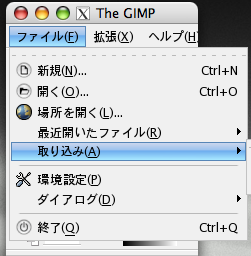
Gimp: Changing language back to english

I do not know why, but one day my Gimp 2.2.10 on my Mac X changed its language from English to Japaneses. I do not know how it happened, but it happened.


As usually in such cases I did a little of web searching and I found some solutions. First proposed solution was to set LANG environment variable to 'en'. Of course I tried it, and of course it did not work.

Second solution that fortunately worked was to delete folder containing Japanese language in Gimp's directory. Hence, I deleted folder ja from:

/Applications/Gimp.app/Contents/Resources/share/locale

After restarting Gimp I had it finally in English.

In conclusion, as far as my case is considered the solution to Gimp language problems is to delete given lang folder from Gimp.app directory.

Sunday, October 29, 2006

Measure program execution time

To measure execution time of any program under UNIX (Linux, Mac X, Solaris) one can use time command. For example

>time ls

>real 0m0.006s
>user 0m0.001s
>sys 0m0.004s


Command time ls measures time used by ls program.

Saturday, October 28, 2006

Matlab: Working with text data files using Perl (2)

This post is continuation of the former post concerning Matlab and Perl work with text files.
Former program, reading rectangles.txt file can be of course written in Matlab, without any Perl help. My example with rectangles.txt is quite simple as far as text file is concerned; nevertheless, I used Perl to read and search this file in order to show how Perl can be used within Matlab.

Below I present Matlab code, that does exactly the same task as Perl script presented in my former post.


function [rect_1 rect_2 point]= getRects(filename)

rect_1=[];
rect_2=[];
point=[];

fid=fopen('rectangles.txt');

while true
tline = fgetl(fid);
if tline(1)=='#', continue;end;
if ~ischar(tline), break, end;

[file,theRest] = strtok(tline);
if ~strcmp(file,filename), continue; end;

RECTs= sscanf(theRest,'%f')';

rect_1=RECTs(1:4);
rect_2=RECTs(5:8);
point=RECTs(end-1:end);

end

fclose(fid);

The question now is which method (Matlab+Perl or Matlab only) is faster?

To check it I used tic;getRects('105aty.tiff'); toc; combination in Matlab both for full Matlab script and Matlab/Perl script. Each script was tested 100 times.

The results are:
Matlab only version : 0.18 (std=0.03) sec
Matlab+Perl version: 0.10 (std= 0.02) sec

It is clearly seen that connection Matlab+Perl to work with text data is considerably faster
that of Matlab only.

Appendix:
Test was made on:
Matlab 7.0.0 (R14) and Perl 5.6.1 running on Sun Fire V440 Server.
std - standard deviation

Friday, October 27, 2006

Matlab: Working with text data files using Perl (1)

Matlab is a great tool when you work with mathematic related software like image processing (assuming that you have appropriate toolboxes, like Image Processing Toolbox). It is very convenient high level programing language, in which you can do, I think, almost everything and many things that are almost impossible in other languages like (C, Java, Perl) are extremely easy here.

Nevertheless, there are few things that are easy and natural in those other languages, whereas in Matlab they become quite difficult. What really annoys me, and not only me, are: (i) lack of hash arrays, (ii) working with text files and (iii) lack of multi-thread work.

Factors (i) and (ii) are closely related. Everyone who has ever used Perl, Ruby or Python to work and mine text files knows that hashes are essential. Of course, they are useful to many other things, however based on my own experience, vast majority of operation of files were based on hash arrays usage. What is more, I have to say, that you can easily work with Matlab without hash tables, and I really did for a long time. But, when recently I needed to process (write/read/create/joining data from few files/extracting and looking for string and numeric data) text files in Matlab, lack of hash tables, and poor file handling operation in Matlab become very frustrating.

Fortunately there is Perl, which is excellent in dealing with text files. However, the most important thing about this, is the fact that Matlab has embedded support for using Perl scripts within Matlab programs using perl function:
Perl is included with MATLAB on Windows systems, and thus MATLAB users can run M-files containing the Perl function. On Unix systems, MATLAB just calls the Perl interpreter that's available with the OS - from Matlab help.
This function can save a lot of work, and make working with files in Matlab very fast, and convenient; in fact, as convenient as Perl is. At the same Matlab page we read:
It is sometimes beneficial to use Perl scripts instead of MATLAB code...
Indeed, it is very beneficial, especially if one works for example with text files and further in this post I am going to show one example how Perl can be used withing Matlab while working with txt files.

1. Data File

My test text file is called rectangles.txt. It contains file names (first column) and description of two rectangles and one point. Each rectangle is characterized by four values: [x y width height].
First rectangle is described in columns 2-6, second in 7-10. Two last colums (11,12) contain
position [x,y] of a point.

2. My task

Little script in Matlab (getRects('filename')), which takes file name, searches given file name in the file, and returns three vectors ( rect_1=[x y width height]; rect_2=[x y width height]; point=[x y]) based on info in the file, for instance:

[rect_1 rect_2 point] = getRects('001anv.tiff');
%GIVES:
rect_1 = [113 302.5 49.035541 58.514286];
rect_2 = [274 292.5 90.87837491 89.96484776];
point = [5.220703 4.375];

3. Method

To do my task, I will create simple Perl script, that will take file name form Matlab, search for data, and returns required vectors to Matlab.

4. Matlab script

Lets start from creating our Matlab script.

function [rect_1 rect_2 point]= getRects(filename)

%execute Perl script
a=perl('getRectPos.pl',filename,'rectangles.txt');
eval(a); %evaluate string returned from Perl

As can be seen the script is very easy. It just executes Perl program passing two arguments to it: (i) filename to be search in the file; (ii) 'rectangles.txt' - name of file to look from.

The interesting fact about this is the eval(a) operation. As described in my former post, Perl returns string representing its standard output. Hence, in order to get Matlab data structures and variables from Perl, it is required to return them as strings, and then execute that string using eval function.

5. Perl script

Finally, we come to the Perl script it self.

#File: getRectPos.pl

#Read arguments from Matlab
my $fileName = $ARGV[0];
my $fileWithRect = $ARGV[1];


#create piece of Matlab code - declaration
#of variables.
my $out="rect_1=[]; rect_2=[]; point=[];";

my %goldHash=&readFileToHash(
$fileWithRect);

if ( exists $goldHash{$
fileName}) {

my @r1 = @{$goldHash{$key}}[0..3]; #(x,y,w,h)
my @r2 = @{$goldHash{$key}}[4..7]; #(x,y,w,h)
my @p = @{$goldHash{$key}}[-2..-1]; #(x, y)

#create the rest of the Matlab code to be executed by eval
foreach my $v (@gmROI) { $out .= "Med(end+1)= $v; "; }
foreach my $v (@glROI) { $out .= "Lat(end+1)= $v; "; }
foreach my $v (@scales) { $out .= "Scales(end+1)= $v; "; }

}

#print string to Matlab
print $out;


sub readFileToHash {
#read file values to a hash table
#key value in this hash is file name (first column)
#data is all the rest columns: 2-12
my $fname = shift;

my %temp=();

open(FG,"<$fname") || die "Cannot find file ",$fname; while () {
chomp;
my ($k,my @rec) = split('\t',$_);
$temp{$k}=[@rec];
}
close FG;
return %temp;
}

6. Results

After executing Perl script, Matlab gets string to variable a. Example content of that string is:

a=
rect_1=[];rect_2=[];point=[];rect_1(end+1)= 104.000000; rect_1(end+1)= 303.000000; rect_1(end+1)= 49.035541; rect_1(end+1)= 58.514286; rect_2(end+1)= 282.964459; rect_2(end+1)= 294.000000; rect_2(end+1)= 49.035541; rect_2(end+1)= 58.514286; point(end+1)= 5.220703; point(end+1)= 4.375000;

after executing evel(a), in Matlab environment all required vectors are created (rect_1,rect_2,point).

7. Conclusion

Thanks to Perl and possibility of using it within Matlab many task concering text files can be solve more easily and more convenient.

Tuesday, October 24, 2006

Firefox 2.0 out now

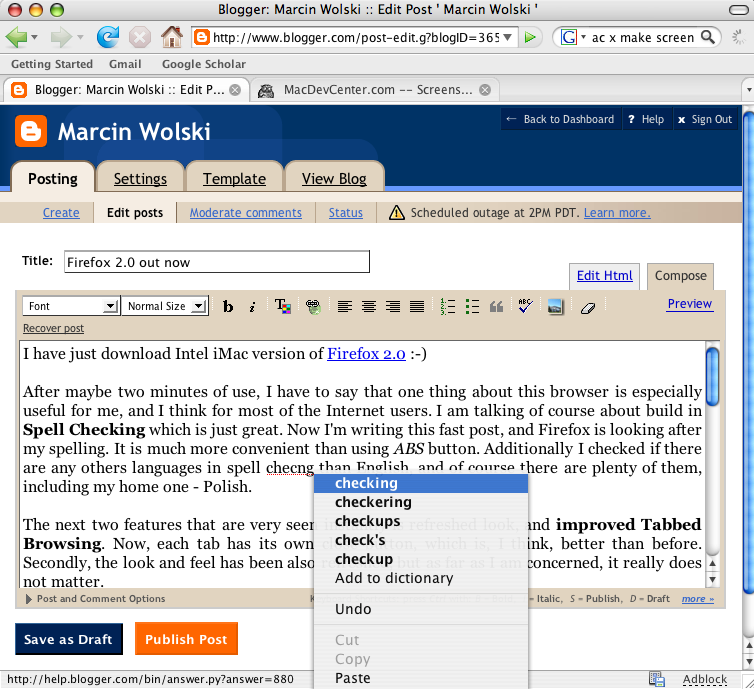
I have just download Intel iMac version of Firefox 2.0 :-)

After maybe two minutes of use, I have to say that one thing about this browser is especially useful for me, and I think for most of the Internet users. I am talking of course about build in Spell Checking which is just great. Now I'm writing this fast post, and Firefox is looking after my spelling. It is much more convenient than using ABS button. Additionally I checked if there are any others languages in spell checking than English, and of course there are plenty of them, including my home one - Polish.


The next two features that are very seen instantly is refreshed look, and improved Tabbed Browsing. Now, each tab has its own close button, which is, I think, better than before.

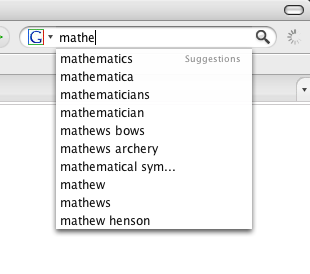
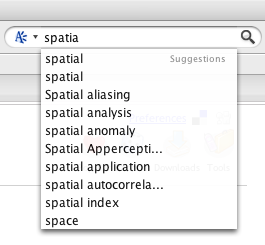
Next, very useful new thing about Firefox is so-called Search Suggestions. Starting typing in search bar, gives a list of suggestion from search engines. For example from Google or Answers.


Of course there are many more new features than those for example: Session Restore, Live Titles, Live Bookmarks, Streamlined Interface, Phishing Protection, Protection from Spyware ..... List of all is here.