for f in *.tiff; do convert -median 2 $f ../outDir/$f; echo $f; done
Friday, March 03, 2006
imagemagick: apply median filter
Apply median filter of radius 2:

Sunday, February 12, 2006
Matlab code time execution
Most people is familiar with tic; toc; commands in matlab to check execution of their code;
But more detail insight into this problem is by profile viewer.
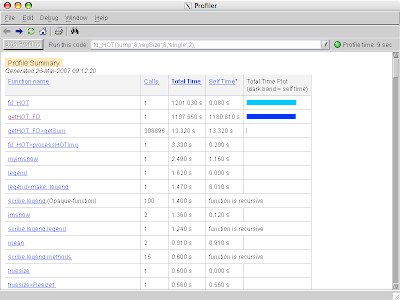
This nice tool shows exactly how much time is used by each line, how many times it is executed. Moreover, profiler also gives some suggestions how to improve execution time.
For example, thanks to profiler I was able to reduce time of one image processing program from few hours to few minutes. Profiler showed me, that very simple operation, takes huge amount of time. Just by removing, changing and rewriting few time consuming lines, I was able to significantly shorten exec time of my program.
But more detail insight into this problem is by profile viewer.

This nice tool shows exactly how much time is used by each line, how many times it is executed. Moreover, profiler also gives some suggestions how to improve execution time.
For example, thanks to profiler I was able to reduce time of one image processing program from few hours to few minutes. Profiler showed me, that very simple operation, takes huge amount of time. Just by removing, changing and rewriting few time consuming lines, I was able to significantly shorten exec time of my program.
Thursday, February 09, 2006
Mac X: Changing bash prompt in X11's xterm
Default bash prompt in my X11's xterm was:
PS1="\h:\w \u"This was very annoying as the prompt contained all the path to the current directory, which was especially bed if I went dip into the directory tree. In such a case it is better to use '\W' option instead of '\w', as this option shows only current directory name, and not full path to it. To change bash prompt use:export PS1="\h:\W \u$ "To make it permanent just add this line to ~/.bashrc.
Thursday, February 02, 2006
Unreal Tournament 2004: Make it slower
UT2004 is very nice and one of my favorite games. One nice option it has it is possibility to setup the speed of the game. You cannot do it in game itself, however, to do it, you must edit:
I use
UT2004.ini file in: \UT2004\System and change the value of variable GameSpeed Originally: GameSpeed=1.000000I use
GameSpeed=0.650000 My computer is not fast enough to render the game in its original speed. Moreover, with slower action, it is easier to observe all those special effects that game has - you can observer, e.g., rocked heading your way, which is pretty nice.
Tuesday, January 17, 2006
Latex: draft option
Writing some long document/article in latex with a lot of figures can be not very nice; providing that, the more figures you have the more time it takes to render your documents. Therefore, sometimes it is usefully to just switch off graphics. This can be done by using 'draft' option in a document class e.g.
Thanks to this embedded pictures are not displayed; instead, only an outline of the box taken up by the picture is shown. This significantly improve rendering.
\documentclass[onecolumn,12pt,draft]{article}Thanks to this embedded pictures are not displayed; instead, only an outline of the box taken up by the picture is shown. This significantly improve rendering.
Sunday, January 15, 2006
Matlab: getargs.m
Get arguments function code (getargs.m)
function S = getargs(defaultS, varglist);

if mod(length(varglist),2) ~=0
    error('Odd number of variable parameters');
end

S = defaultS;
i=1;
while i <= length(varglist)
    if isfield(S, varglist{i})
        S.(varglist{i}) = varglist{i+1};
    else
        warning_wrap('getargs:unknown_param', ...
                ['Unknown parameter "' varglist{i} '"']);
    end
    i = i+2;
 end
Tuesday, January 10, 2006
Ubuntu: quick setup of vsftpd server
Instead of proftpd it is faster to use vsftpd. After installation (sudo apt-get install vsftpd) just:
And uncomment lines:
Finally restart server by:
sudo vim /etc/vsftpd.confAnd uncomment lines:
write_enable=YES
local_enable=YES
and comment line: #anonymous_enable=YESFinally restart server by:
sudo /etc/init.d/vsftpd restart
Subscribe to:
Posts (Atom)